

Inside Microsoft's AI Revolutions For Schools
The Tools That Are Set To Transform Teaching and Learning in 2026

A conversation with Dan Bowen, Technology Strategist at Microsoft
Artificial Intelligence (AI) is moving fast — and education is keeping pace. At a recent breakfast presentation hosted by Solutions IT, Dan Bowen, Technology Strategist for Microsoft, shared an exclusive NDA briefing on the latest developments in Microsoft Education. From new Copilot capabilities to upcoming features designed specifically for teachers and students, his insights gave school leaders a clear look at where AI is headed and how it’s shaping the classroom of tomorrow.
Dan, Microsoft’s Copilot has become a household term. What’s new for education users?
We’ve moved beyond AI as a simple assistant. The new Microsoft 365 Copilot now includes personalised memory, agentic AI, and deeper integration with everyday tools like Teams, OneNote and Outlook. This means educators and students can interact with AI that “remembers” preferences, adjusts to communication styles and helps automate repetitive tasks. For example, teachers can generate lesson plans, summarise student feedback or translate documents, all within the apps they already use.
What does “agentic AI” mean, and why does it matter for schools?
Agentic AI is the next evolution of Copilot where teachers can set up customised agents for tasks like building learning activities, designing rubrics or creating assessments. For IT administrators, these agents can be managed centrally through the Microsoft 365 Admin Centre to maintain control and compliance.
Copilot Chat is now available for students aged 13 and over. How does that work safely?
That’s a big milestone. Students aged 13+ can now access Copilot Chat in Microsoft 365 apps, with full enterprise-grade data protection. Everything runs within the school’s secure Microsoft environment, meaning no data is shared externally. It opens the door for students to safely use AI to brainstorm, write, and problem-solve while still giving schools full oversight.
You mentioned new tools designed specifically for educators. What are the highlights?
The standout is the upcoming Teach Module in Microsoft 365 Copilot. It’s built to support the full teaching cycle from planning and assigning to assessing, and communicating. Teachers will be able to adapt lessons for different student levels, generate curriculum-aligned content, and provide AI-supported feedback on assignments. The module also integrates with tools like Teams Assignments and Classwork, so it fits naturally into existing workflows
Feedback is such a time-consuming part of teaching. How will AI help?
Microsoft is introducing AI-enhanced feedback features that align with rubrics, comments and instructional tone. Teachers can select whether they want feedback written in a “basic,” “instructional,” or “coaching” style. The system then drafts feedback based on student work and teacher notes which are editable, but saves hours of manual effort. It’s like having a digital teaching assistant that helps educators focus more on relationships and less on paperwork
What about learning tools for students?
Students will soon see Learning Activities within Microsoft 365 which is a set of interactive features such as flashcards, fill-in-the-blanks and matching tasks that teachers can generate from lesson content. These make revision more engaging and adaptable to different learning styles. The upcoming Study Guide within Copilot Notebooks will also help students consolidate learning by creating quizzes and practice exercises based on class materials.
Security and data privacy are key concerns. How is Microsoft addressing these?
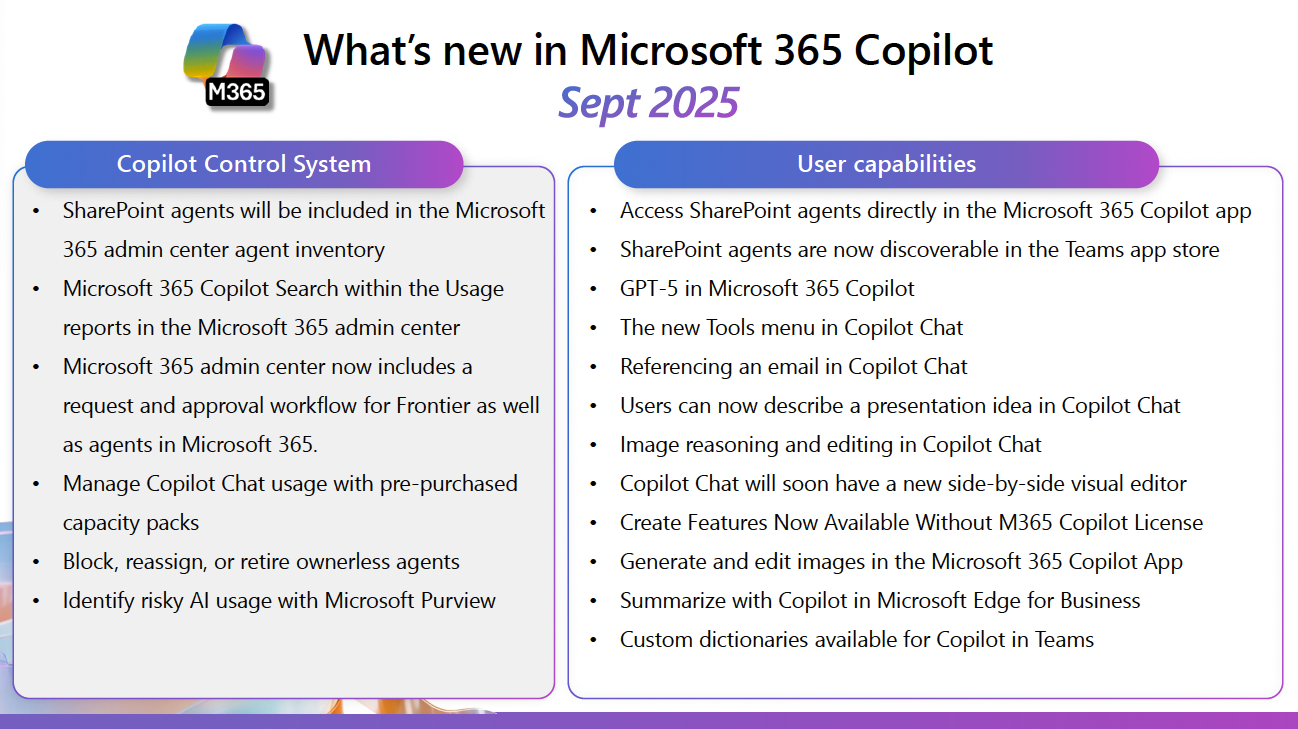
We take that incredibly seriously. Tools like Microsoft Purview and SharePoint Advanced Management help schools identify and mitigate risky AI behaviour, ensuring compliance with privacy regulations. Administrators can track AI usage, block unauthorised access, and classify sensitive data which keeps student information safe while enabling innovation.
How will these updates affect IT teams managing school systems?
We’ve introduced Copilot Control Systems to simplify administration. IT teams can now monitor Copilot usage through capacity packs, manage or retire ownerless agents, and view analytics directly in the Microsoft 365 Admin Centre. The goal is to make AI deployment scalable and transparent for schools, with predictable costs and clear governance.
Are these features already available?
Some are live now, including GPT-5 integration into Microsoft 365 Copilot, Copilot Chat for students 13+, and the Purview AI risk management tools. Others, like the Teach Module and Learning Activities, are scheduled for release through late 2025. Microsoft intentionally rolls out education features in stages to allow schools time to explore and prepare for adoption.
Finally, how do you see AI shaping the future of education?
AI isn’t replacing teachers — it’s amplifying their impact. It’s about freeing time, personalising learning, and giving every student access to tailored support. Whether it’s through writing assistance, data insights or creative exploration, the goal is the same: to make learning more human, not less.
About Dan Bowen
Dan Bowen is a Technology Strategist for Microsoft. He supports K-12 independent and Catholic schools across Australia with strategies spanning AI, data, security and devices. He co-hosts the AI in Education podcast and is completing a PhD focused on AI and equity in Australian education.
Solutions IT partners with Microsoft Education to bring these innovations to WA schools. If you’d like to explore how Copilot and AI can support your digital learning strategy, get in touch — our team can guide you through available programs and exclusive education pricing.